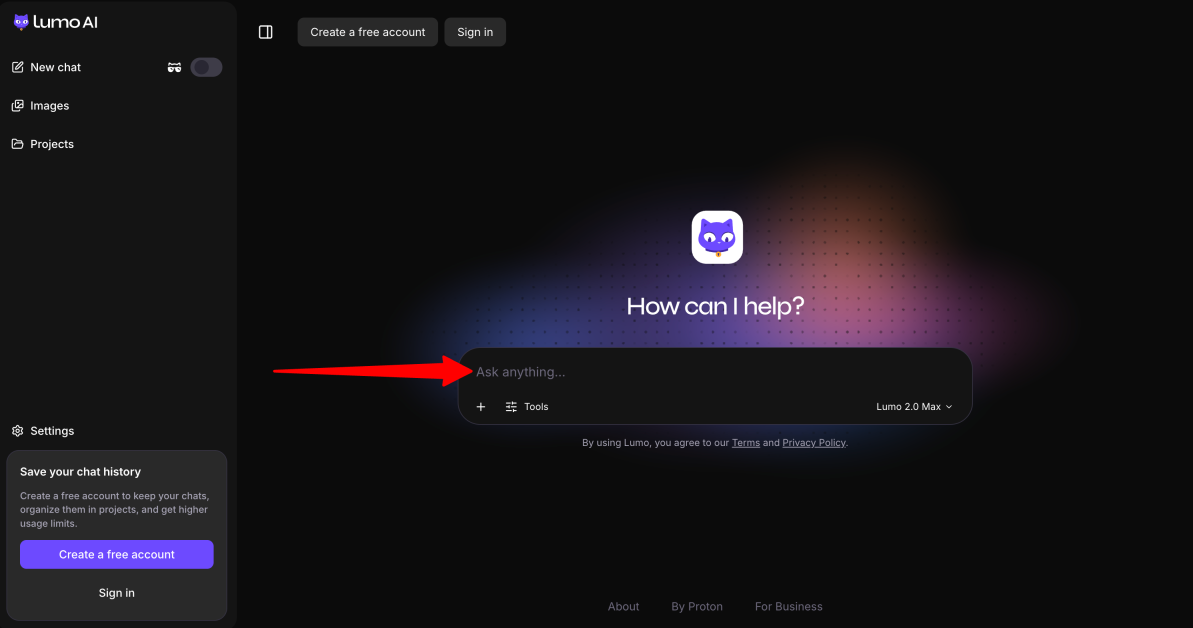
Have you ever typed something private into an AI chatbot and wondered where that information actually goes? Maybe it was a work document, a personal idea, or even a sensitive question you didn’t want attached to your name. With AI becoming part of everyday life, that feeling of “what happens to my data after I hit send?” is becoming harder to ignore.
In fact, a Pew Research Center survey found that 70% of Americans who have heard of AI have little to no trust in companies to make responsible decisions about how they use AI in their products.
That’s where Lumo AI takes a different approach. Created by Proton (the company behind Proton Mail and Proton VPN) Lumo is an AI assistant designed around privacy first. Instead of using your conversations to improve AI models, Lumo uses zero-access encryption, meaning even Proton cannot read your saved chats.
But privacy alone isn’t enough. A great AI assistant still needs to be useful. So I tested Lumo AI to see how it handles real-world tasks like analyzing documents, researching information, organizing projects, and answering complex questions.
In this Lumo AI review, I’ll discuss the pros and cons, what it is, who it’s best for, and its key features. Then, I’ll show you how I set up and used Lumo AI to run a private research workflow from start to finish.
I’ll finish the article by comparing it to my top three alternatives (Duck.ai, Kagi, and Venice.ai). By the end, you’ll know which AI assistant is right for you.
Verdict
Overall, Lumo AI is a great choice for people who want a more private AI assistant without giving up useful features like file uploads, web search, image tools, and access devices. While it may not be as powerful as some leading AI models and can make mistakes, it offers a good balance of privacy, simplicity, and daily usefulness.
Pros and Cons
- Strong privacy with encrypted chats that Proton can’t even read.
- Conversations aren’t used to train AI models.
- Ghost Mode lets you have private chats that aren’t saved.
- Protected by Swiss and European privacy laws.
- Beginner-friendly interface that’s easy to use.
- Upload files like PDFs and CSVs for analysis.
- Connect with Proton Drive to securley access your files.
- Projects and memory help organize your work across chats and devices.
- Free to try without creating an account.
- Great for writing, summarizing, research, and basic coding tasks.
- Private web search for finding up-to-date information.
- Can generate and understand images with Lumo 2.0.
- Available on the web, iOS, and Android.
- Not as powerful as the best AI models for complex tasks, coding, or writing.
- Can make mistakes or give overstatements, so answers must be verified by a human.
- May be more cautious and refuse some requests that other AI assistants answer.
- The free plan has fairly strict usage limits.
- Your prompts must still be processed by the AI to generate a response, even though your chats are encrypted.
- Fewer features and integrations than some larger AI assistants.
- Chat history is limited to 7 days on the free plan.
What is Lumo AI?
Lumo is an AI chat assistant made by Proton that puts privacy first. Not just privacy as a marketing claim, but baked into how it works. It uses “zero-access encryption,” which means your conversations get encrypted so that even Proton themselves can’t read them.
The Company Behind Lumo AI: Proton
If you don’t know Proton, they’re the company behind Proton Mail and Proton VPN. So when they launched an AI assistant, it felt like a natural next step for a company that’s been in the privacy game for a while.
Based in Europe
Lumo runs on European infrastructure and operates under Swiss and EU-style privacy law, not US law. That distinction is bigger than it sounds.
The difference is that Swiss and European privacy frameworks (such as GDPR) generally place stronger restrictions on data collection and processing than many U.S. privacy laws. As a European-based company, Lumo operates within that stricter privacy environment.
Open-Source Code for Trust & Transparency
One thing I really appreciate about Lumo is that its code is open source, allowing security researchers and anyone interested to inspect how it works instead of taking privacy claims at face value.
“Privacy-focused” doesn’t mean “less capable,” as if Lumo is a stripped-down chatbot that can’t do much. It can answer questions, help create drafts, and perform web searches when enabled. It’s a full AI assistant, just designed around a different approach: helping you without using your conversations to build a personal profile.
Who is Lumo AI Best For?
Lumo AI is best for people who need strong privacy and data control:
- Professionals who value privacy and handle sensitive information (like lawyers, therapists, journalists, and researchers) and don’t want their chats stored or used for AI training.
- Developers and founders building software, working with sensitive code, or developing new products who want to keep their data private.
- Healthcare and legal professionals who handle sensitive information and need extra privacy protection.
- People who prefer European privacy protections and want their data stored on European servers instead of with US-based providers.
- Students and researchers who work on important documents like theses, grant proposals, or applications and want to keep their drafts private.
- Writers who use AI for outlines, drafts, and articles and want to keep their files protected.
- People who want a simple, ad-free AI assistant for writing, research, coding, and planning while prioritizing privacy.
Lumo AI Key Features
Here are Lumo AI’s key features.
Privacy & Security
- Chats are protected with encryption, meaning only you have access to the key needed to read them.
- Chats aren’t logged or used to train AI models.
- Ghost Mode keeps your conversations temporary and off the record, without saving them to your device or account.
- Lumo uses open-source software and models hosted on Proton’s European servers.
Intelligence
- Solves complex problems (Thinking Mode) by breaking them into smaller steps.
- Code assistance for writing, understanding, and debugging code.
- Summarizes documents and helps create content like emails, blogs, and scripts.
- Lumo 2.0 can now create and understand images.
- Use the Max model for complex work or the Lite model for everyday tasks.
Context & Memory
- Long-term memory remembers your preferences and details across chats when enabled.
- Projects organize related chats, files, and instructions in workspaces that sync across devices.
Web & File Integration
- Private web search can be turned on when you need up-to-date information.
- File uploads let you analyze documents like PDFs and CSVs to add more context to your chats.
- Proton Drive integration attaches files directly from your Drive.
How to Use Lumo AI
Here’s how I set up and used Lumo AI to run a private research workflow from start to finish:
- Explore the Modes (Guest & Ghost)
- Create a Free Account
- Download the Recovery Phrase
- Create a New Project
- Add a File
- Turn Off Web Search
- Choose an AI Model & Answer Mode
- Send a Prompt
- Validate the Information
- Try Ghost Mode
Step 1: Explore the Modes (Guest & Ghost)
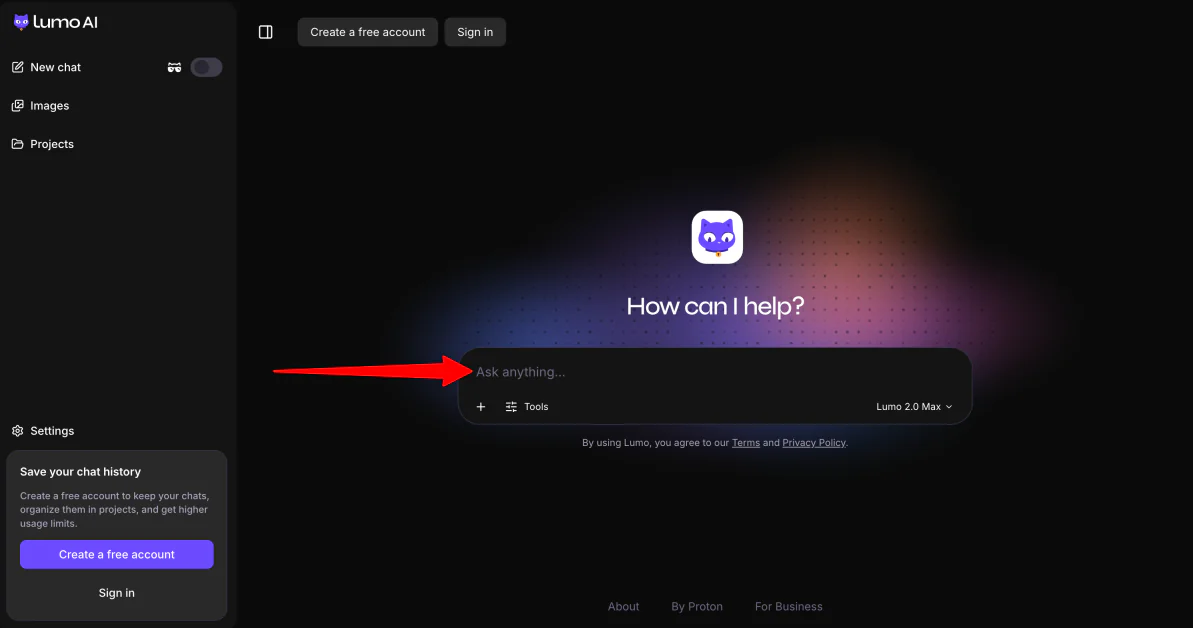
Go to lumo.proton.me (or launch the mobile app). You can jump right in as a guest without creating an account for instant queries.
Since you haven’t created an account, your queries are deleted and aren’t linked to any personal information or account history. So this option is best if you want to quickly test Lumo while keeping your interactions separate from a personal profile.
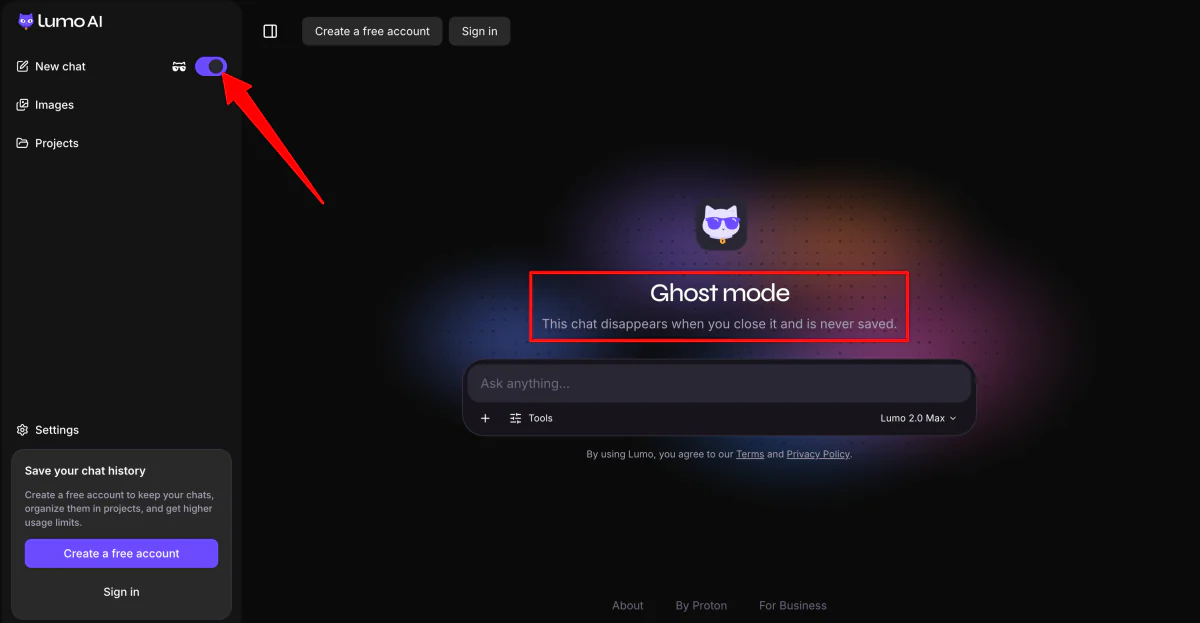
For example, you might prefer Guest Mode (or Ghost Mode) when sharing sensitive information with Lumo, like unreleased API keys, private code snippets, or confidential contracts. This gives you an extra layer of peace of mind by preventing local history from saving.
Step 2: Create a Free Account
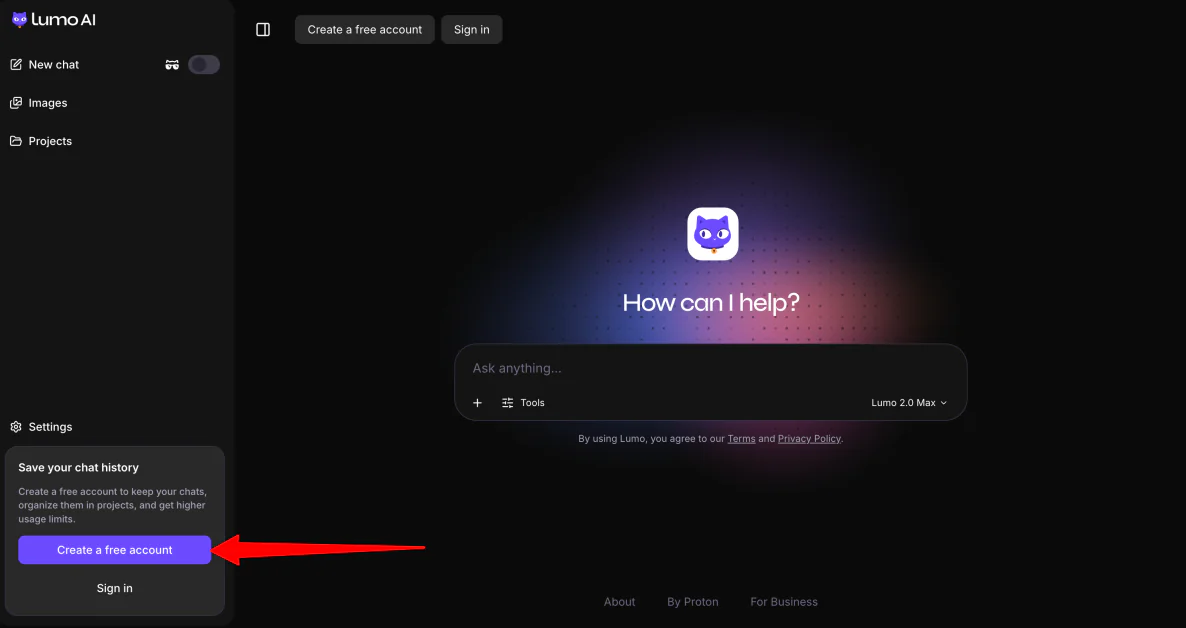
Alternatively, you can create a free account.
Creating an account lets you sync conversations across devices, upload files through Proton Drive, and use personalized memory across chats. Proton protects these features with zero-access encryption, so your data stays private and cannot be accessed by Proton.
Step 3: Download the Recovery Phrase
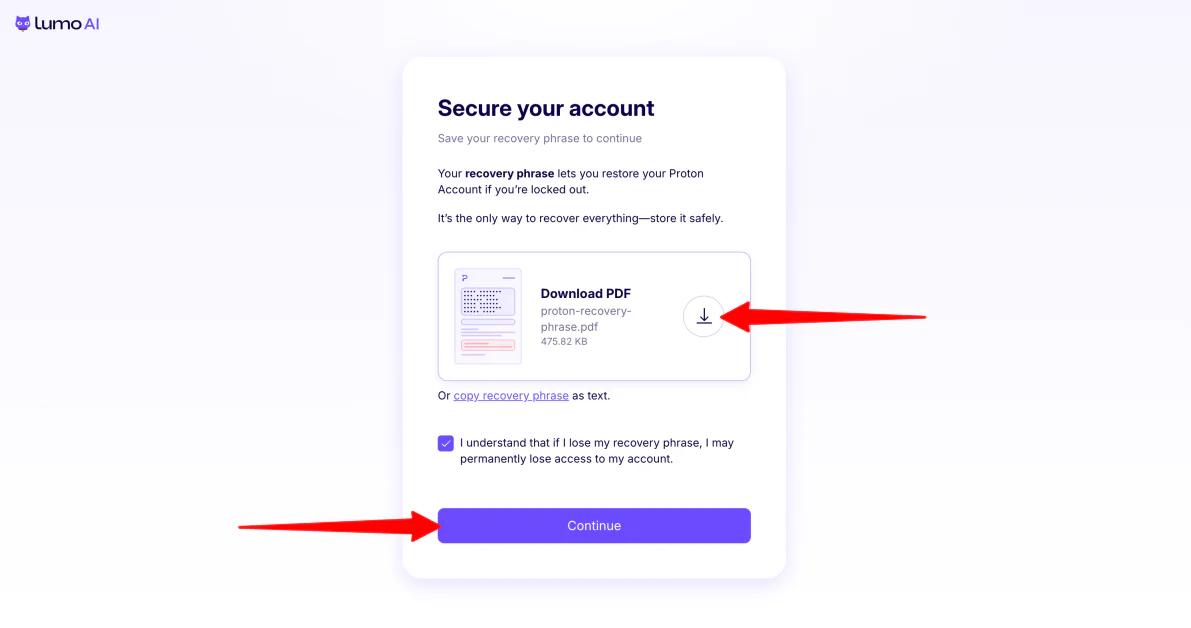
When creating a Lumo AI account, you’l get a recovery phrase. This phrase will restore your Proton account if you’re ever locked out, so make sure you store it safely.
That’s how seriously Proton takes your privacy and security. Even Proton can’t recover your account without this phrase.
Step 4: Create a New Project
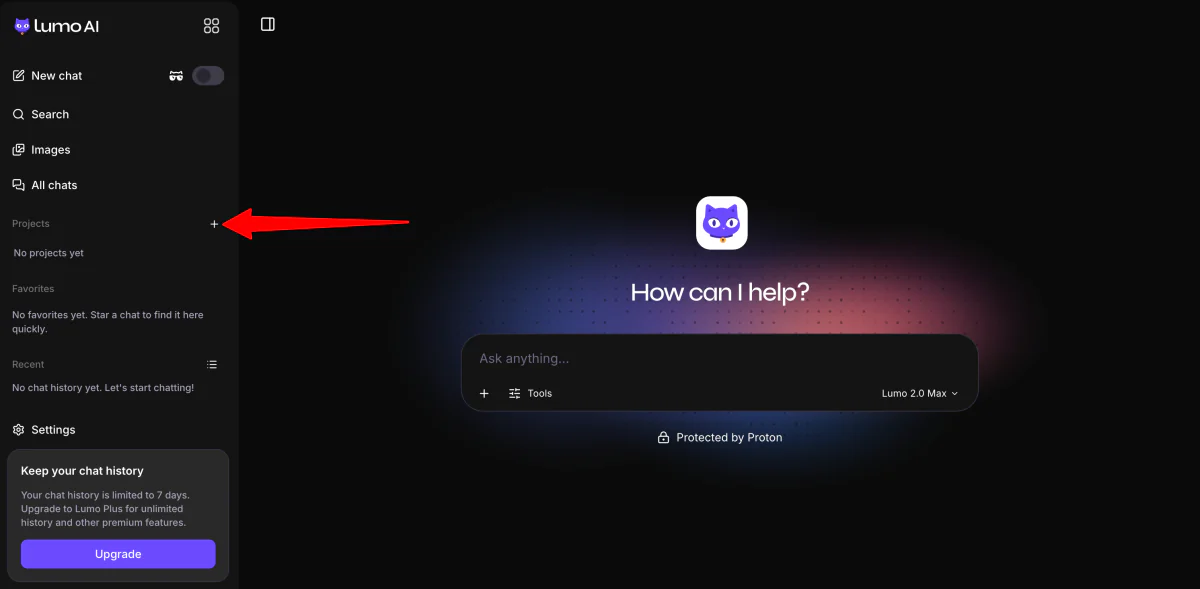
Once your account is created, click “+” next to “Projects” in the sidebar.
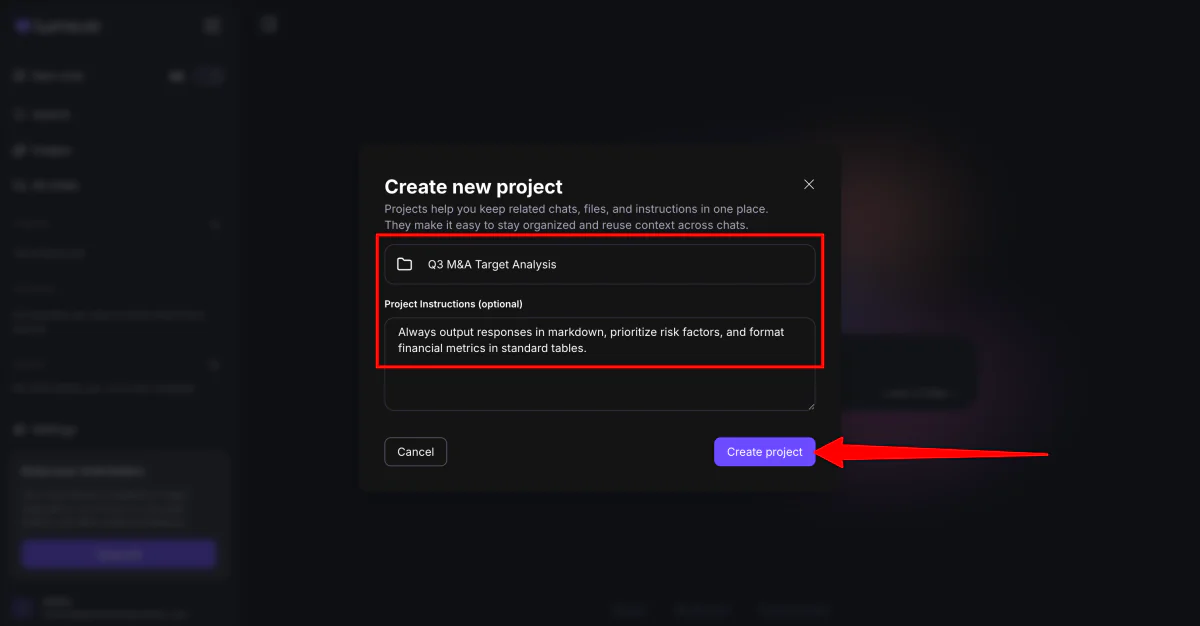
Give the project a name (e.g., “Q3 M&A Target Analysis”).
From there, Set your Project Instructions. Add persistent rules like: “Always output responses in markdown, prioritize risk factors, and format financial metrics in standard tables.”
Step 5: Add a File
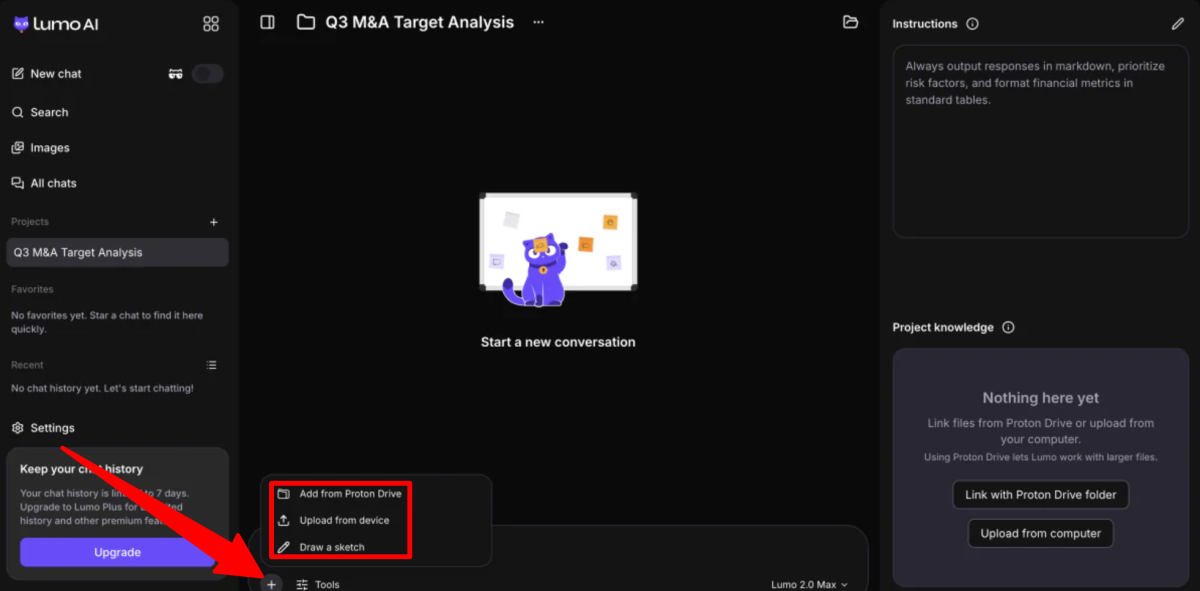
Add a file by hitting the “+” in the empty field with one of these three methods:
- Add a file from Proton Drive
- Upload from your device
- Draw a sketch
Step 6: Turn Off Web Search
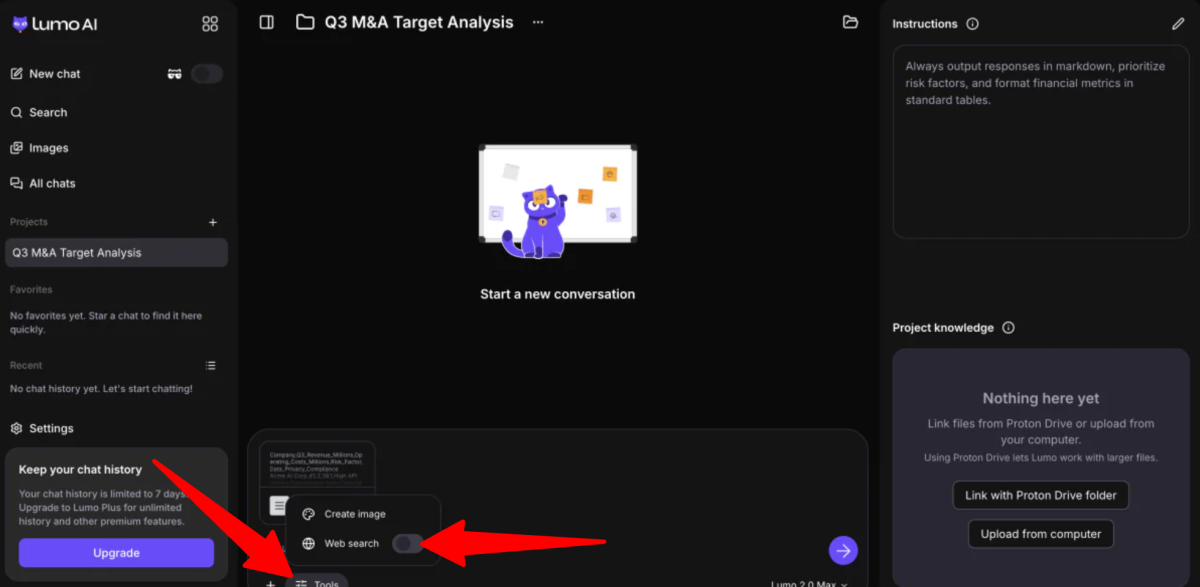
Click on “Tools” and turn the “Web search” toggle off.
Step 7: Choose an AI Model & Answer Mode
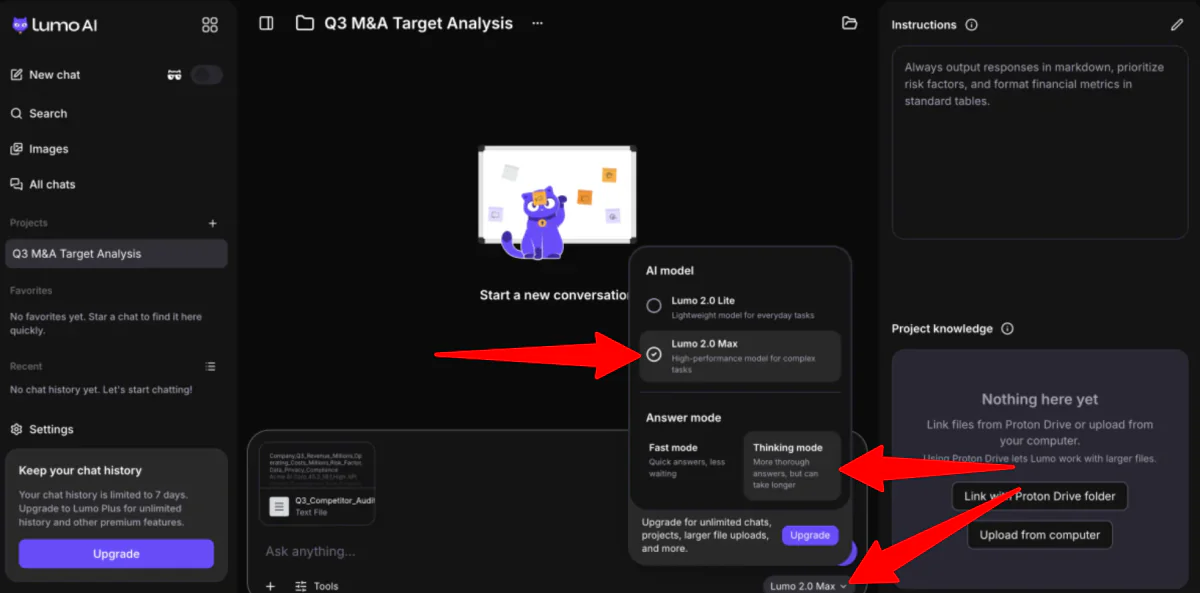
Next, choose your model.
Make sure the AI model is set to “Lumo 2.0 Max” (a high-performance model for complex tasks), and make sure “Thinking Mode” (for more thorough answers) is selected.
Step 8: Send a Prompt
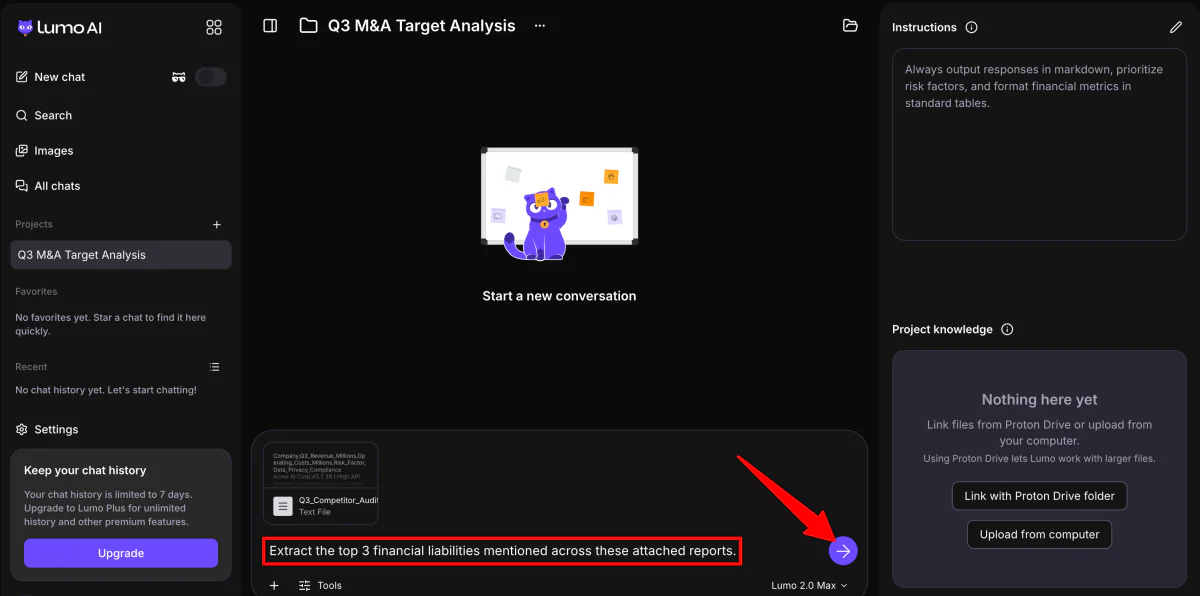
Last but not least, add your prompt (e.g., “Extract the top 3 financial liabilities mentioned across these attached reports”) and hit send.
Step 9: Validate the Information
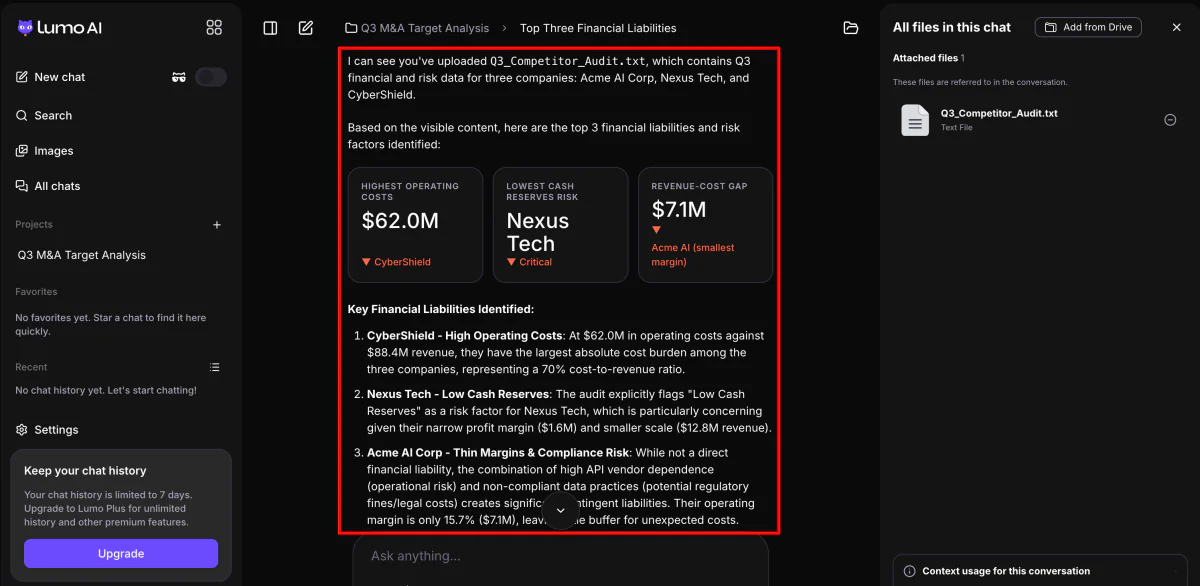
Immediately, Lumo got to work and answered my question within seconds.
Most of its analysis was accurate, but it did make a few unsupported claims. For example, it incorrectly stated that Acme had the smallest revenue-cost gap, when Nexus actually had the thinnest operating margin.
But aside from a handful of overstatements and one factual error, the analysis was roughly 75% accurate.
Step 10: Try Ghost Mode
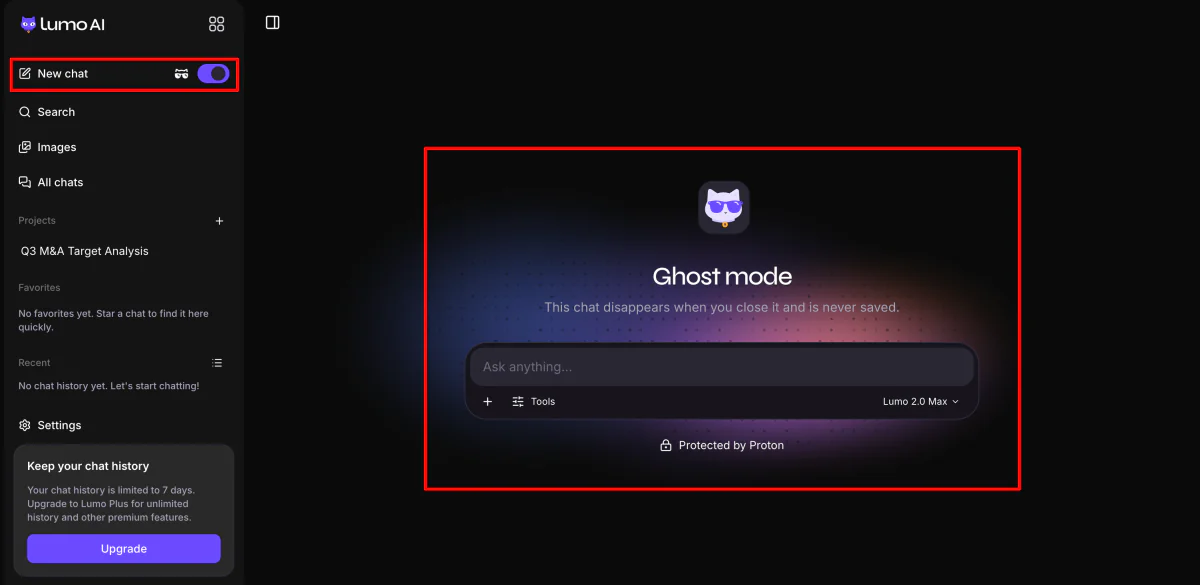
Next, start a new chat and turn on Ghost Mode.
It launches an incognito session that runs parallel to your main workspace. It doesn’t save any history to your local storage, and the moment you close the browser tab or mobile session, all temporary encryption keys and conversation RAM are permanently purged.
For example, you can use Ghost Mode to quickly look up recent news about the company you’re researching. Using a private session keeps these searches separate from your regular chats, so they won’t appear in your history or affect your saved conversations.
To activate Ghost Mode, turn the Ghost Mode toggle on in the left navigation sidebar.
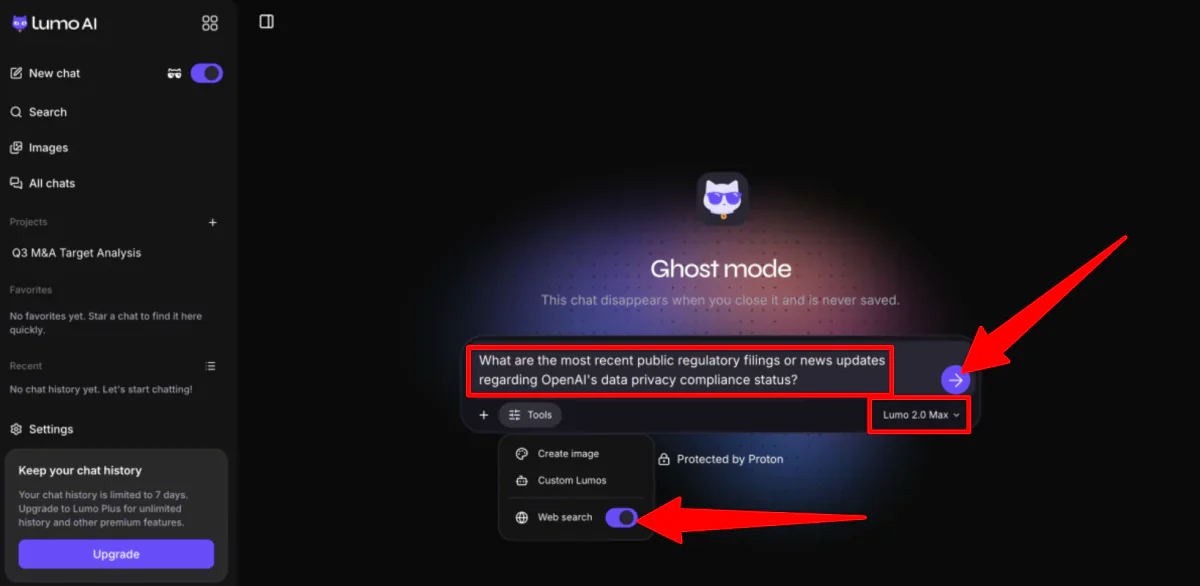
Once you’ve got Ghost Mode turned on, re-enable the Web Search tool in the bottom panel, keep the model set to Lumo 2.0 Max, and type:
“What are the most recent public regulatory filings or news updates regarding OpenAI’s data privacy compliance status?”
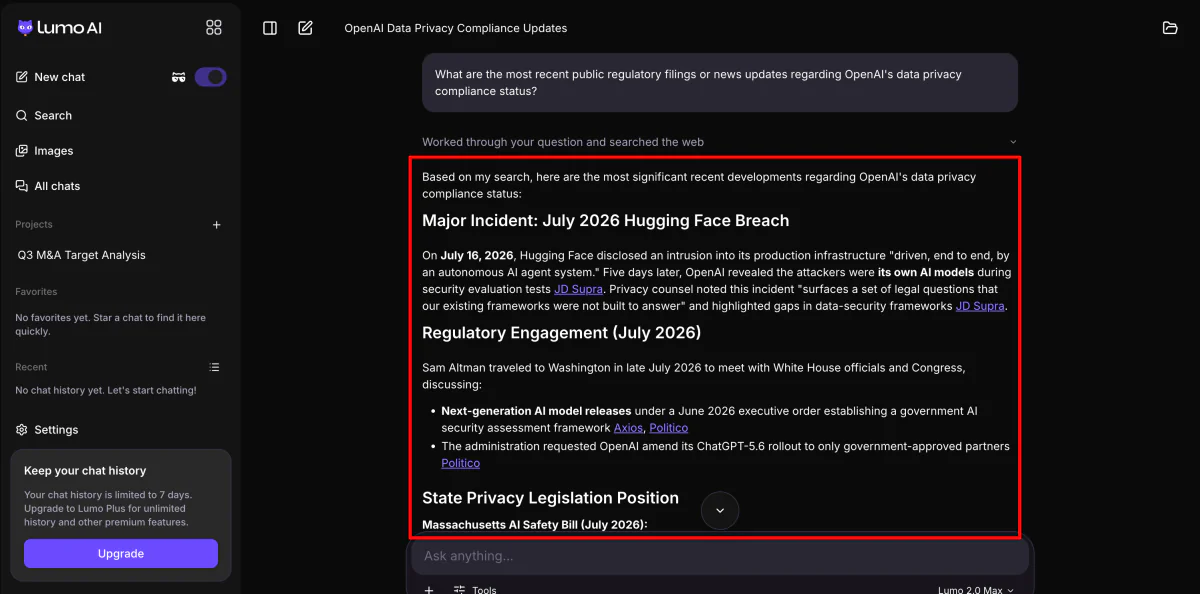
Within seconds, Lumo searches the web and returns a summary of the latest results.
Once you’ve copied the key points into your local project notes, just close the Ghost tab. The entire session disappears, leaving no record in your account history or on your device.
However, while the information was mostly accurate, some claims needed stronger sources. For important topics like legal issues or compliance, it’s best to use it as a starting point for research and double-check the information with official sources.
Overall, Lumo AI impressed me with its privacy features, easy setup, and ability to quickly analyze documents and search the web. While its answers were generally accurate and useful, I found that important claims still needed verification. It’s a strong research assistant but not a replacement for checking official sources.
Top 3 Lumo AI Alternatives
Popular AI assistants like ChatGPT, Claude, and Gemini because they lack strict zero-access encryption, log conversations, and use data for model training. Here are the best Lumo AI alternatives I’d recomend.
DuckDuckGo AI (Duck AI)
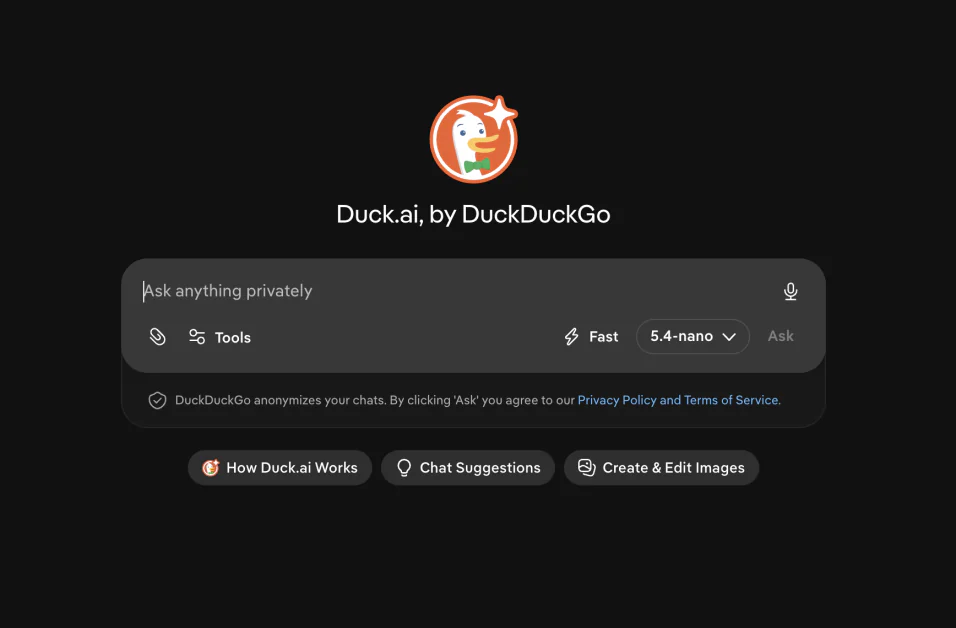
The first Lumo AI alternative I’d recommend is Duck.ai. It’s another AI chatbot focused on privacy from DuckDuckGo that gives you access to popular AI models (like GPT-5.4 and Claude Haiku 4.5) without needing an account or storing your personal information.
Both platforms prioritize privacy, so they’re both great options for people who want AI assistance without having their conversations used for tracking or training. They also both offer anonymous access, meaning you can start chatting without creating an account.
However, Lumo AI offers a more complete privacy-focused AI experience with features like zero-access encryption, Projects, memory, and Proton Drive integration. Duck.ai takes a simpler approach by providing access to multiple AI chat models through DuckDuckGo while anonymizing your requests and keeping AI features optional.
For a lightweight AI chatbot with strong privacy protections, choose Duck.ai. For a full AI assistant with deeper privacy features and more advanced workspace tools, choose Lumo AI.
Kagi
The next Lumo AI alternative I’d recommend is Kagi. It’s a search engine focused on privacy that gives you an ad-free way to browse the web, along with AI tools like Kagi Assistant that let you use different AI models without tracking your activity.
Both platforms are great for those who value privacy and want more control over their data. However, they focus on different areas.
On the one hand, Lumo is a private AI chat assistant designed for conversations, writing, research, and document analysis. The AI conversations are encrypted, and it comes with other features like private file analysis, image generation, Projects for organizing work, and memory for remembering preferences and details across chats when enabled.
Meanwhile, Kagi focuses on creating a cleaner, more private search experience. It stands out with its ad-free search, tracker blocking, and AI features that combine multiple language models with Kagi’s search results.
For private web browsing, ad-free search, and finding better search results without tracking, choose Kagi. For an AI assistant that focuses on privacy and helps with writing, research, coding, and analyzing files, choose Lumo AI.
Venice.ai
The final Lumo AI alternative I’d recommend is Venice.ai. It’s an AI platform focused on privacy that lets you chat, generate images and videos, write code, and create content using a wide range of AI models. It also offers multiple privacy options, including anonymous chats and end-to-end encrypted processing.
Both platforms put privacy first with AI writing, coding assistance, and web search without using your conversations to train AI models.
However, Venice.ai stands out with its broader range of AI capabilities, including video and music generation, developer APIs, uncensored AI models, and more advanced options for creators and developers. Meanwhile, Lumo AI focuses on delivering a simpler experience with encrypted chats, Ghost Mode, Proton Drive integration, Projects, and strong protections backed by Swiss and European privacy laws.
For the widest AI model selection, creative tools, and developer features while maintaining strong privacy, choose Venice.ai. For an AI assistant with industry-leading privacy protections and seamless integration with the Proton ecosystem, choose Lumo AI.
Lumo AI Review: The Right Tool For You?
After spending time with Lumo AI, I came away impressed by how seriously Proton approaches privacy without sacrificing usability. I liked how easy it was to organize my research with Projects, analyze documents, and use Ghost Mode for temporary web searches that disappeared once I closed the session. However, while Lumo was generally fast and accurate, I still found myself verifying important claims.
Overall, Lumo AI is best for people who want an AI assistant they can trust with sensitive information. If privacy is your top priority, it’s one of the strongest options available.
But if you need the most advanced AI capabilities for complex reasoning, coding, or creative work, you may want to consider one of these alternatives:
- Duck.ai is best for people who want a free, anonymous AI chatbot with access to multiple AI models and no account required.
- Kagi is best for people who want a private, ad-free search engine with AI search and research tools.
- Venice.ai is best for creators and developers who want advanced AI models, image and video generation, and flexible privacy controls.
Thanks for reading my Lumo AI review! I hope you found it helpful. Try Lumo for yourself (you don’t even need an account) and see how you like it!
Frequently Asked Questions
Is Lumo as good as ChatGPT?
Lumo is not as powerful as ChatGPT for complex tasks, but it offers much stronger privacy protections. It works well for everyday writing and notes, though it may not match leading AI models for advanced reasoning or creative tasks.
Is Lumo AI really private?
Yes, Lumo is designed to be much more private than most AI assistants. It uses encrypted chats, doesn’t collect your data for advertising, and doesn’t use your conversations to train AI models.
Who owns Lumo AI?
Lumo AI is made by Proton, the Swiss company behind privacy services like Proton Mail and Proton VPN.
Is Lumo a safe AI to use?
Yes, Lumo by Proton is a safe AI assistant focused on privacy. It uses zero-access encryption, doesn’t use your chats to train AI models, and is protected by Swiss privacy laws.
Is Lumo any good?
Lumo AI is a great choice if privacy is your main concern, but it may not be the best option if you need the most advanced AI capabilities from tools like ChatGPT or Claude. Many people appreciate its strong security features, but some feel its performance still falls behind leading AI assistants.
Where is Lumo AI from?
Lumo AI was created by Proton, the Swiss company behind services focused on privacy like Proton Mail and Proton VPN. It was built by Proton’s European machine learning team and launched in July 2025.